Data cleanupDataScrub
40+ focused tools
DataScrub handles repetitive cleanup. NonprofitReports turns general-ledger data into connected nonprofit financial statements, workpapers, and checks.
See trial and download detailsShaped by more than 20 years of nonprofit finance experience.
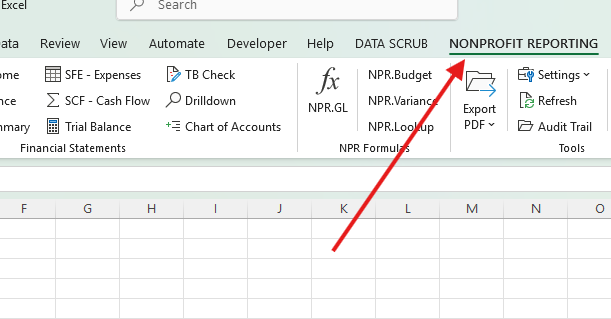
Actual Excel interfaces shown
Use either product on its own, or pair them to clean source data before producing the reporting package.
For accounting, finance, operations, and data teams
A practical collection of 40+ Excel tools for cleaning, validating, transforming, and importing messy data.
For nonprofit controllers, CFOs, accountants, and auditors
Turn a general-ledger export into a connected nonprofit reporting package with classifications, controls, workpapers, and drill-down.
Both products are delivered as a single portable launcher that selects the correct Excel architecture automatically.
Download one file, open it, and choose “Open in Excel.” No setup wizard or permanent registration is required.
Spreadsheet contents are processed on the Windows computer. Trial and license checks exchange only protected identifiers and status information.
Previews, reconciliation checks, visible workpapers, drill-down, and guarded changes help finance users verify the output.
These products were created around the work that consumes finance teams every month: cleaning inconsistent exports, mapping accounts, allocating expenses, reconciling statements, and preparing review-ready schedules.
NonprofitReports places the reporting workflow directly in the Excel ribbon.
DataScrub includes a fixed 72-hour trial. NonprofitReports includes a fixed seven-day trial. Merely downloading or opening the launcher does not start either trial.
Choose the product and save its portable launcher.
The launcher detects 32-bit or 64-bit Excel and loads the correct add-in.
The secure trial begins only when the first licensed feature is used.
Download a portable trial—no credit card and no installation required.